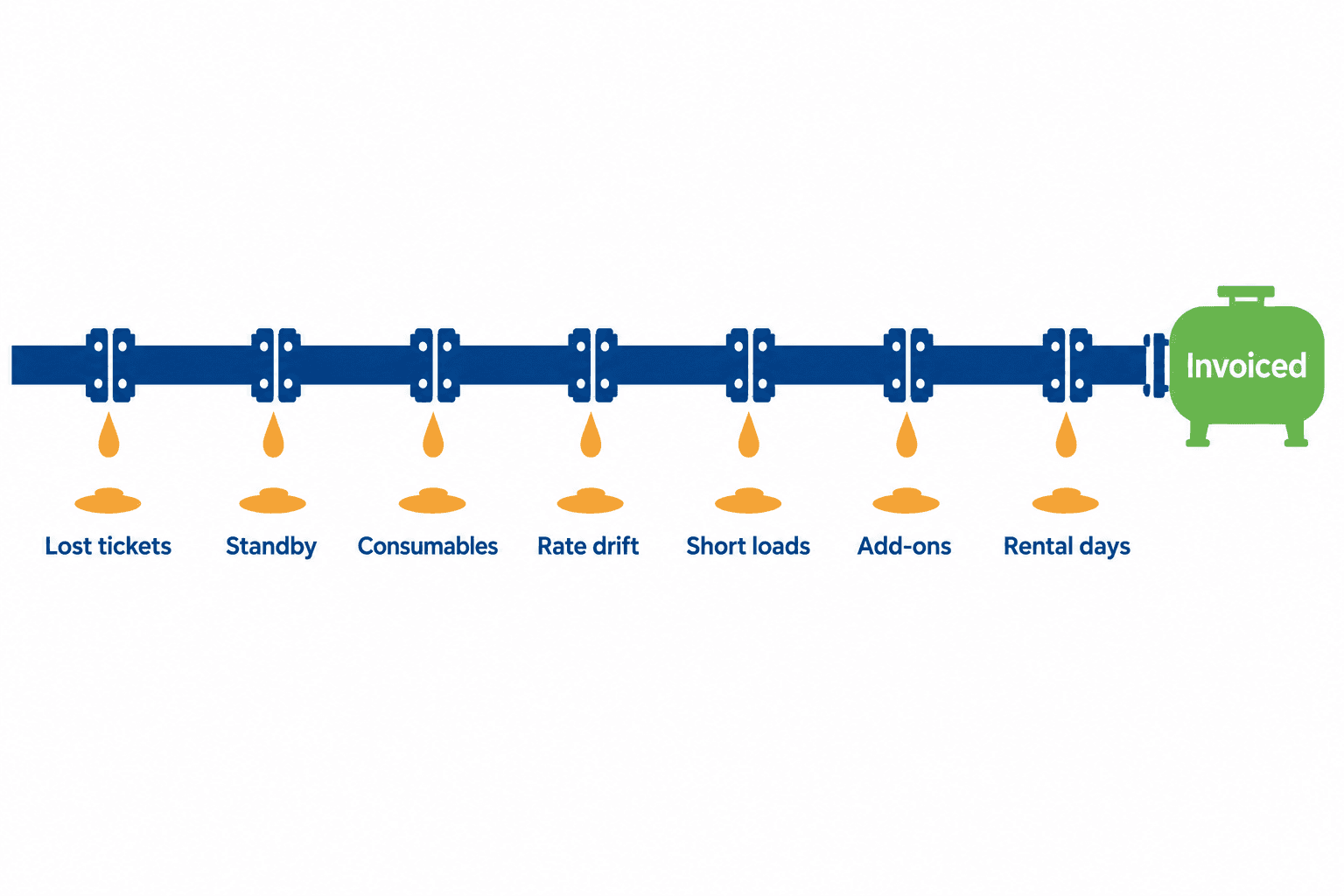


Twelve Reasons Operators Reject Oilfield Invoices, and the Ticket-Level Fix for Each
Your crew ran the job. The company man watched them do it. The work was good.
Six weeks later the invoice is still unpaid, sitting in a rejected queue because the service date on line four was the date you invoiced rather than the date you worked.
Nothing about that rejection is a dispute over the work. It is a data problem, and it is expensive. Every rejection sends the invoice back to the start of an approval cycle that already takes weeks. Fix it, resubmit, and you wait out the operator's full payment terms again from the resubmission date — not from the date you originally billed. Hess states this directly in its supplier guideline: payment timing is calculated from "the day of a complete and successful invoice submission following the requirements," and "document date will not be considered."
That sentence is the whole problem in one line. Your invoice date does not start the clock. Their acceptance does.
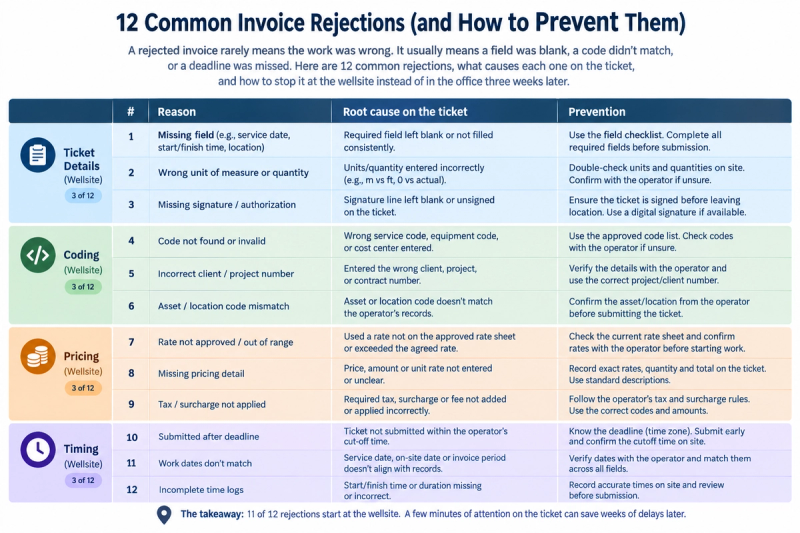
The good news is that almost every rejection reason traces back to a specific field on a specific ticket, filled in — or not filled in — at the wellsite. Here are the twelve that come up most, grouped by where they originate.
Ticket problems
1. No signed field ticket attached
The single most common rejection in the oilfield. Operators want proof their representative accepted the work before they pay for it. ARC Resources "requires a stamped or signed field ticket or delivery slip for most invoices," and ConocoPhillips requires that "an approved electronic field ticket must be tied to all invoice submissions" for eTicketing suppliers. A ticket signed on paper and photographed badly counts as unsigned if the signature is illegible.
2. Missing supporting documentation
For hourly and daily work, the ticket alone is rarely enough. XTO requires timesheets showing the "Name and title of person performing Work," hours worked, rate, and "Approval from XTO's Representative." Hess asks for third-party charge receipts, signed delivery tickets, and inspection reports where applicable. Missing backup is a rejection, not a query.
3. Illegible or unreadable attachments
A mundane and entirely avoidable category. XTO requires PDF or TIFF at "300 dpi or higher," not encrypted, not password-protected, with .zip files explicitly refused and a 10 MB email cap. Hess reserves "the right to reject any invoice with an unclear format" and states that "submissions with multiple attachments or zipped files will be automatically rejected." A phone photo of a carbon copy on a truck dashboard fails this test regularly.
4. Wrong or missing well, location, or facility
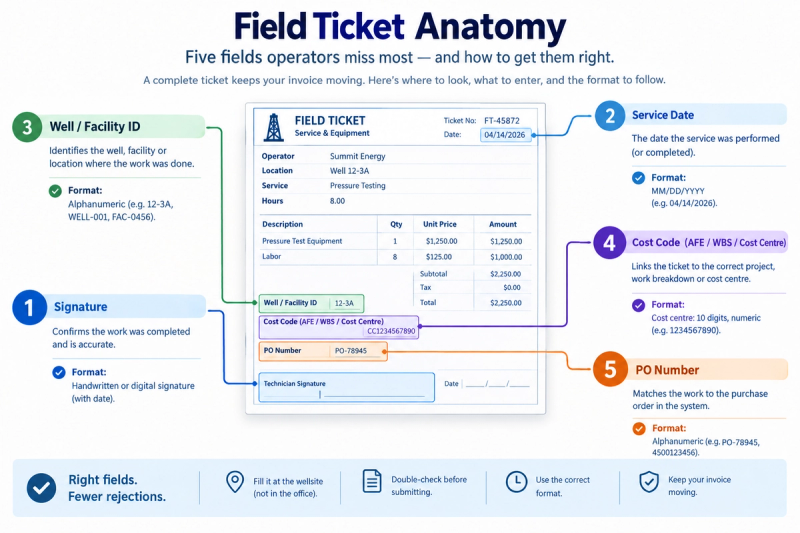
The operator codes cost by location. A ticket that says "Smith pad" when their system expects a legal land description or facility ID cannot be routed to the right cost object, so it is returned. ConocoPhillips requires facility or property identification — the well location or facility — on eTickets.
Coding problems
5. Missing or invalid PO number
Where a PO governs the work, its absence stops everything. ConocoPhillips requires a "Valid ConocoPhillips Purchase Order Number (10 digit identifier beginning with 45" or the order contact name, and states plainly: "If an invoice is submitted without one or more of the above mentioned required fields, it will be rejected."
6. Multiple POs on one invoice
Operators split invoices by PO. Hess allows exactly "ONE (1) per invoice." ConocoPhillips notes that "separate invoices may be required" across different purchase orders or legal entities. Bundling a month of work across three POs into one invoice guarantees a return.
7. Wrong cost coding — AFE, WBS, cost centre, or charge code
This is where formats bite. ARC requires either a WBS or a cost centre on every invoice, with capital WBS codes in alphanumeric form like DRL.240001 and cost centres numeric and exactly 10 digits — and instructs suppliers not to mix WBS and cost-centre coding on the same ticket. Hess blanket POs must reference a Network Activity or Work Order code carrying four leading zeroes (000012345678IZ30). A code that is right in substance but wrong in format still fails validation.
8. Wrong legal entity
Large operators run many legal entities. ConocoPhillips requires the invoice be "addressed to the proper legal entity name." Hess requires billing "to the correct Hess legal entity as per the PO" and the supplier name on the invoice to match the supplier name on the PO. Bill the parent instead of the subsidiary that holds the contract and it comes back.
Pricing problems
9. Rate doesn't match the price book
The quiet margin-killer. When a price book is in effect, the rates you submit must equal the rates it holds. ARC tells suppliers to confirm the green flag that confirms alignment. XTO lists "prices not matching the Pricebook" among its stated return reasons. Hess is blunt about precedence: "The electronic Pricebook takes precedence over all other pricing documents." A negotiated increase that never made it into their price book is not a price increase — it's a rejection.
10. Quantity exceeds the PO
ARC instructs suppliers not to submit quantities flagged as exceeding PO quantity, and to contact the buyer to have the PO adjusted first. Submitting anyway converts a five-minute phone call into a multi-week loop.
11. Maths, tax, and unit-of-measure errors
Hess requires that "invoice price, quantity, and unit of measure must match the PO." ARC permits a maximum of two decimal places on quantities and rates, prohibits negative quantities on standard invoices, and requires credits to be submitted as separate credit invoices. Billing hours where the PO says days is a rejection even when the total is correct.
Timing problems
12. Late submission
The one that surprises people. Hess requires invoices "within 30 days of work completion," and warns that submission beyond 30 days "may result in payment delays." Work a job in March, find the ticket in June, and the contractual basis for prompt payment may already be gone. Standard Hess payment terms are 60 days on top of that — from successful submission, not from your invoice date.
The pattern underneath all twelve
Read the list again and something becomes obvious. Eleven of the twelve are decided at the wellsite, in the minutes when the ticket is filled out. Only one — late submission — is purely an office failure, and even that one usually starts with a paper ticket that took eleven days to reach the office.
The office cannot fix a missing signature. It can only chase one.
This is why the industry's rejection problem has not been solved by better AP departments. By the time an invoice reaches a rejection queue, the crew is three jobs away, the company man has rotated out, and the ticket is a photograph of something that happened last month. The cost of correction at that point is measured in weeks. The cost of correction at the moment of signing is measured in seconds.
Enverus, which operates the OpenInvoice and OpenTicket platforms most of these operators use, reports that one large service provider "reduced rejected invoices by 80% after switching to digital tickets." That figure is anecdotal and attributed to an unnamed customer — treat it as directional. But the mechanism behind it is not mysterious: validation moves from after submission to before signature.
Build a pre-submission checklist
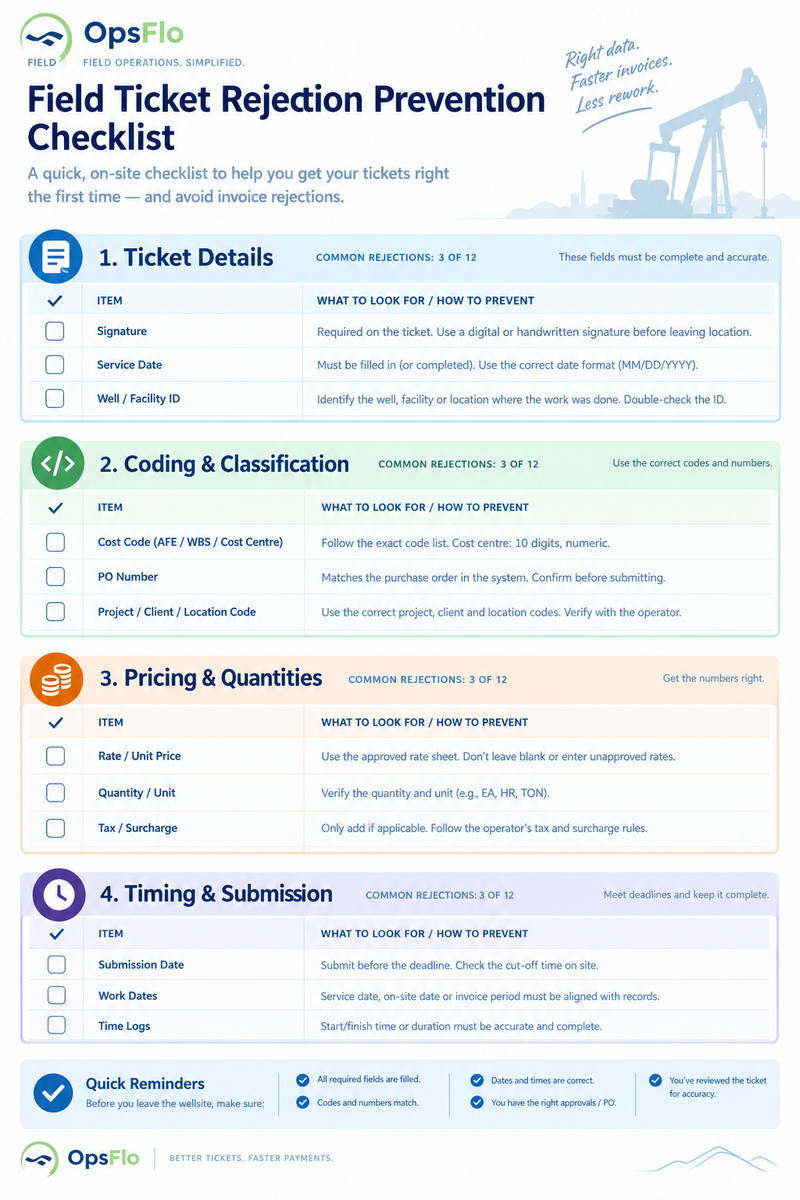
Whatever system you use, the checklist below covers the twelve. Run it before anything leaves your office.
- Signed ticket attached, signature legible, signer's name printed
- Timesheets attached for hourly or daily work, with the operator representative's approval
- Attachment is a readable PDF, 300 dpi or better, unencrypted, not zipped, under the size cap
- Well, pad, or facility identified the way the operator's system expects it
- One PO per invoice, PO number valid and current
- Cost coding present and in the exact format required — digit counts, leading zeroes, prefixes
- Correct legal entity, and supplier name matching the PO
- Every rate checked against the current price book
- Quantities within PO limits, units of measure matching the PO
- Service dates are dates of work, not dates of invoicing
- Submitted within the contractual window — 30 days for Hess, and check your MSA for the rest
Where OpsFlo fits
OpsFlo's field ticketing module is built on the assumption that the checklist above should run on the tablet, not in the office. Tickets are "validated against rate cards and contracts," and in the product's own words, "missing fields are flagged before submission." The customer signs on the device — e-signature on site, with photo documentation of the work attached to the ticket rather than emailed separately. The module works offline, so a dead zone on a lease road delays nothing and loses nothing.
The point is not that software makes rejections impossible. Operators change their requirements, and someone still has to keep the price book current. The point is that a required field the crew cannot skip is worth more than a rejection the office catches six weeks later.
If your rejection rate is something you have never actually measured, start there. Count last quarter's rejections, group them against the twelve above, and you will usually find that two or three causes account for most of them — and that both live on the ticket.
Related reading
No comments yet
Be the first to share your thoughts.
Leave a Reply
Your email address will not be published. Required fields are marked *